
Vision+ Utility2.1 - App Store
You'll be able to see results in few seconds.
Publisher Description
NOTE: This app is not compatible with iOS 8
Vision+ Utility features a flight logger to record flight details as you fly (eg. GPS latitude longitude altitude speed, battery level, IMU info). Log file can be directly imported to the Dashware Software.
It enhances the DJI Phantom 2 Vision+ WiFi video connection performance. It will boost the WiFi between range extender and transmitter output signal to increase the FPV range up to 100%.
It also enables the encryption between the range extender and your device.
In order to preserve the battery life, iOS keeps the background execution time to a minimum. There is a 5 minutes logging time limit and local notification reminder will alert you to stop / continue the logger. Also, please make sure your device maintains strong wifi connection and high battery level before enabling the logger.
It is a must-have app for doing long range FPV (First Personal View).
Booster Usage:
1. Power on both Phantom 2 Vision+ aircraft and range extender.
2. Connect your device to DJI Phantom Vision+ Wi-Fi network.
3. Select the camera transmit power (15-17 dBm is recommended) to boost up the Wi-Fi.
Encryption Usage:
1. Click Security to enble the encryption.
2. Enter the encryption password and click the renew button to reboot the range extender.
3.After the range extender reboots, using the encryption password you entered to re-connect to your newly encrypted range extender.
How it works:
The encryption is done by the openwrt official UCI System. The wifi configuration file is surely RESTORABLE by resetting the range extender. After you reset and restart the Range Extender. You will need to bind it with the Phantom 2 Vision+ again to recreate its Wi-Fi network.
Flight Logger Usage:
1. Power on both Phantom 2 Vision+ aircraft and range extender.
2. Connect your iOS device to DJI Phantom Vision+ Wi-Fi network.
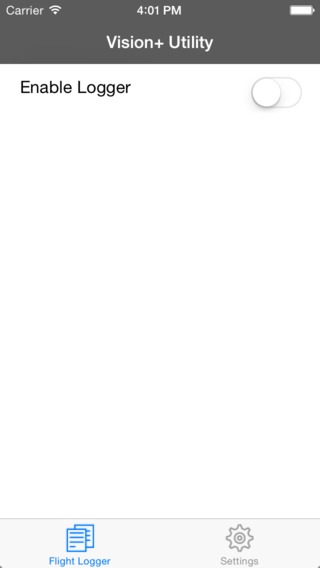
3. Open Vision+ Utility app, slide the Enable Logger switch to turn on the logger.
4. Open DJI Offical Vision+ app, and go to CAMERA mode.
5. Your flight details will be recorded to your iOS device.
6. A five minutes local notification reminder will alert you to stop / continue the logger.
7. Using iTunes, you can copy log files between your computer and your iOS device
How it works:
After you enable logger, there is a pre-installed separate server program running on your phantom to monitor the serial port that is used by the DJI official app. This server side program sends the flight info to our app and then our app records the info to a csv log file. It does not change any phantom related config files and there is no impact on your phantom and the DJI official app operation.
WARNING: This App is only compatible with DJI Phantom 2 Vision+. Please make sure you have the latest DJI firmware and Vision app installed.
Fail to follow the usage instruction to operate will cause unexpected damage and we accepts no liability for the damage.
Requires iOS 7.1 or later. Compatible with iPhone, iPad, and iPod touch.
About Vision+ Utility
The company that develops Vision+ Utility is KA YUE MAK. The latest version released by its developer is 2.1.
To install Vision+ Utility on your iOS device, just click the green Continue To App button above to start the installation process. The app is listed on our website since 2014-07-06 and was downloaded 0 times. We have already checked if the download link is safe, however for your own protection we recommend that you scan the downloaded app with your antivirus. Your antivirus may detect the Vision+ Utility as malware if the download link is broken.
How to install Vision+ Utility on your iOS device:
- Click on the Continue To App button on our website. This will redirect you to the App Store.
- Once the Vision+ Utility is shown in the iTunes listing of your iOS device, you can start its download and installation. Tap on the GET button to the right of the app to start downloading it.
- If you are not logged-in the iOS appstore app, you'll be prompted for your your Apple ID and/or password.
- After Vision+ Utility is downloaded, you'll see an INSTALL button to the right. Tap on it to start the actual installation of the iOS app.
- Once installation is finished you can tap on the OPEN button to start it. Its icon will also be added to your device home screen.
Program Details
System requirements
Download information
Pricing
Version History
version 2.1
posted on 2014-07-06
Disclaimer
Official App Store Link
We do not host Vision+ Utility on our servers. We did not scan it for viruses, adware, spyware or other type of malware. This app is hosted by Apple and passed their terms and conditions to be listed there. We recommend caution when installing it.
The App Store link for Vision+ Utility is provided to you by apps112.com without any warranties, representations or guarantees of any kind, so access it at your own risk.
If you have questions regarding this particular app contact the publisher directly. For questions about the functionalities of apps112.com contact us.
